Free Billing Software for PC — Fast Counter POS Without Heavy Installs
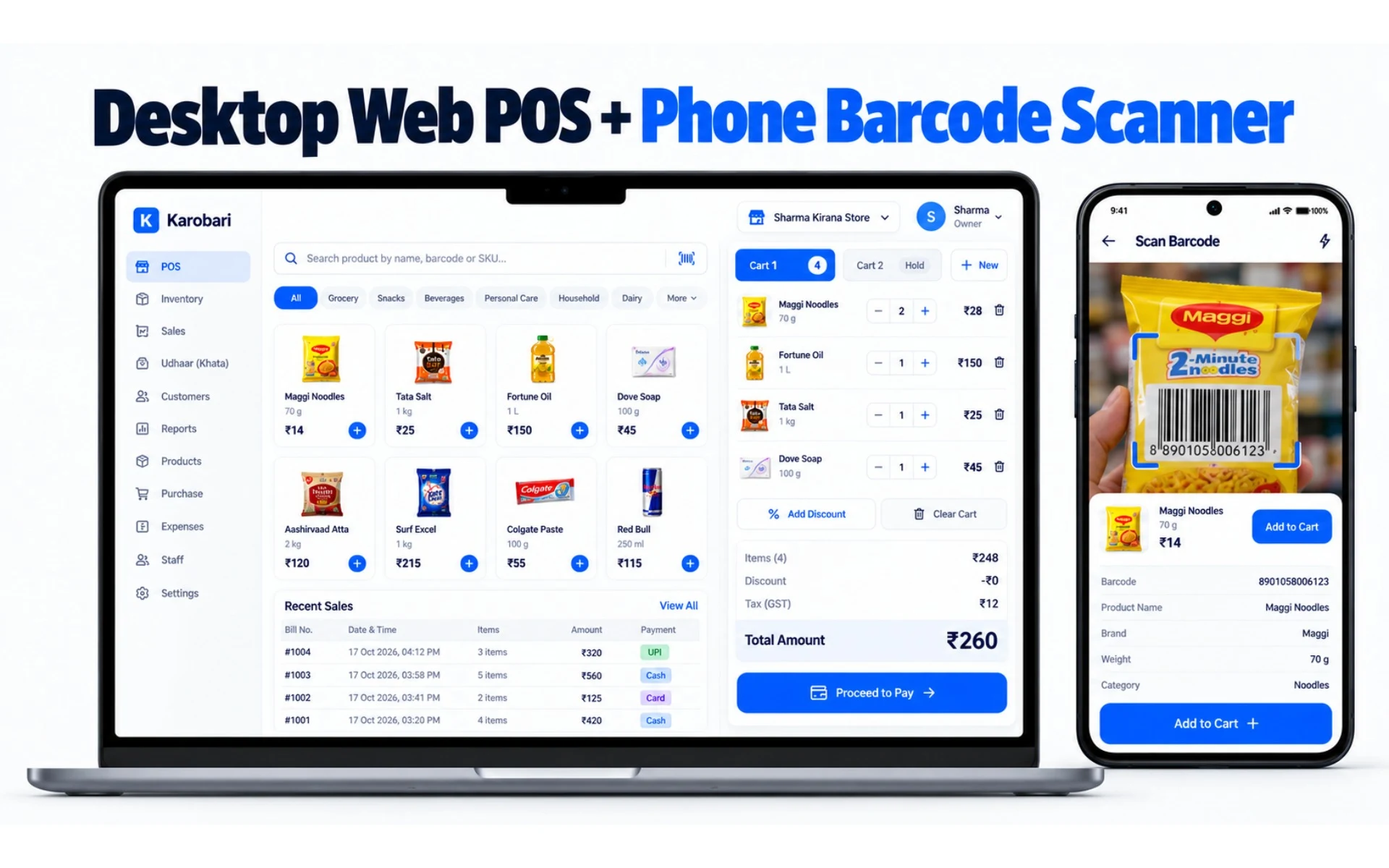
Open app.karobariapp.in in your browser. Zero .exe downloads, zero driver CD setups, zero activation dongles, and 100% free forever. Plug your USB barcode gun, connect your 58mm/80mm thermal printer, and bill in under 5 seconds.
Why Indian shopkeepers hate legacy PC billing software
Most "free download" billing software on the internet is designed to trap your counter. Here is why the Web Till is different.
The 500MB .exe Installer Trap
Heavy setup files that require .NET frameworks, freeze older dual-core counter computers, and fail to install on modern Windows without IT help.
Karobari Web Till:
Instant Web Till in Chrome/Edge: Zero downloads. Loads in under 2 seconds on any computer with 2GB RAM.
The 30-Day 'Free Download' Paywall
Software advertised as 'free download' that locks you out after 30 days or prints big promotional watermarks across your bills until you pay yearly fees.
Karobari Web Till:
100% Free Forever: Unlimited bills, unlimited products, unlimited customers, and zero watermarks on your receipts.
Single-Computer Hard Drive Crash Risk
Legacy desktop software stores all ledger and sales data on one local C: drive. If the hard disk fails or Windows corrupts, years of shop records vanish.
Karobari Web Till:
Seamless Mobile & Cloud Sync: PC sales sync with your phone. If power drops, continue billing on your Android phone immediately.
Everything your PC counter needs to bill fast
Keyboard shortcuts, USB barcode scanner guns, and instant thermal printing on any desktop or laptop.
Keyboard-Only Fast Billing
Ring up long queues without touching a mouse.
Press Space to search products, Enter to add, F2 to open payment, and Enter to complete. Cashiers can tender a multi-item sale in under 5 seconds with standard desktop QWERTY shortcuts.
USB & Bluetooth Barcode Guns
Plug-and-play barcode scanner support with 0.1s scanning.
Works with all standard 1D and 2D handheld USB and wireless barcode scanner guns. Scanned barcodes automatically match items in your catalogue and append them straight to the active bill.
WebUSB & Web Bluetooth Thermal Printing
Print 58mm and 80mm receipts directly without driver CDs.
Connect USB or Bluetooth thermal receipt printers directly through WebUSB and Web Bluetooth. Streams native ESC/POS commands with zero driver installation, plus A4/A5 laser/inkjet support.
Dual-Screen Customer Display
Live checkout board on any second screen, tablet, or phone.
Open /customer-display on any secondary monitor facing the customer. Live items update instantly as you scan, displaying itemized totals and an enlarged UPI QR for frictionless digital payments.
Zero Setup & Zero .exe Downloads
Runs instantly in Google Chrome, Microsoft Edge, or Brave.
No 500MB installer to download, no .NET Framework runtime errors, and no administrator privileges required. Open app.karobariapp.in on any Windows 10/11 laptop or desktop PC and start billing.
Instant QR Login & Biometric Unlock
Sign in with phone QR or Windows Hello / Touch ID / Fingerprint.
Open the Web Till, scan the screen QR code with your mobile app, or touch your fingerprint sensor to authenticate in 1 second. Counter staff never need to memorise or expose passwords.
Trade-Tailored Receipts & Standard QR
Specific receipt layouts for Pharmacy, Kirana, Apparel, and Food.
Auto-detects your business sector to print Doctor, Patient, D.L. No, and Schedule H notices for chemists, FSSAI for food, automatic MRP cuts with savings badges, and standardized 96px/116px UPI QR codes.
12 Indian Languages On Screen
Native UI and bill prints in your mother tongue.
Full desktop interface available in Hindi, English, Marathi, Gujarati, Tamil, Telugu, Kannada, Bengali, Punjabi, Odia, Malayalam, and Assamese. Switch languages with a single click.
Cashier & Manager Role Delegation
Assign staff PINs and supervisor manager duties safely.
Separate routine cashier billing from supervisor duties. Managers can oversee daily turnover, view reports, manage customer udhaar, run CSV stock imports, and reorder shelf sections, while shop deletion and owner credentials remain locked.
Runs on any PC or laptop you already have
No expensive POS machines required. Karobari runs on standard retail computers.
How to start billing on your PC in 3 steps:
- Open the Web Till: Visit app.karobariapp.in in Chrome or Edge on your computer.
- Scan to Link: Open the Karobari mobile app on your Android handset and scan the QR code on your PC screen.
- Start Billing: Your items, prices, and settings appear instantly. Start scanning barcodes or typing items!
Common questions about free PC billing software
Is this billing software really free for PC with no hidden fees?
Yes, 100% free. Karobari has no monthly software subscriptions, no bill count paywalls, and no watermark on printed receipts. You can create unlimited bills and manage unlimited products without entering a credit card.
Do I need to download a .exe setup file to use it on PC?
No download is required. Karobari runs as an instant Web Till at app.karobariapp.in inside any modern browser like Google Chrome or Microsoft Edge. This avoids heavy setup files, DLL errors, and admin permission issues.
Can I connect my USB barcode scanner and thermal receipt printer?
Yes. Standard USB and Bluetooth handheld barcode scanners work automatically without drivers. 58mm (2-inch) and 80mm (3-inch) thermal receipt printers connect directly via WebUSB or Web Bluetooth for instant zero-driver ESC/POS receipts.
Can I bill on both PC and mobile phone simultaneously?
Yes. Your counter staff can bill on a PC or laptop while another staff member or owner bills on an Android smartphone or tablet. All inventory decrements and bill records sync automatically.
Does the PC software work for GST and non-GST retail bills?
Yes. You can issue regular retail receipts (kaccha bill/estimate) without tax, or toggle your GSTIN in settings to print GST-compliant invoices showing taxable value and tax totals.