Thermal Printer & WhatsApp Receipt BillingMost bills never touch paper. Here is what happens when one does.
Four ways a finished bill reaches a customer, three of which need no hardware at all. The fourth is paper, and there is a printer this app cannot reach — that is said plainly further down rather than left for you to find out at a counter.
Instant digital invoice via chat with dynamic UPI QR • 0 hardware needed
Universal image snapshot • Handed over or sent anywhere without customer app
Official vector invoice formatted for 58mm, 80mm, or A5 stationery
Android Print Spooler via Wi-Fi router or USB-OTG cable
Four ways out, and the sale is already saved before any of them
This is the part worth holding on to: the bill is recorded, numbered and on the phone the moment you take payment. Everything below is about handing a copy to somebody, so a printer that will not connect costs you a receipt and never a record.
The bill as a message, in a chat with the customer. This is how most receipts in most shops actually reach somebody, it needs no hardware, and it is the first control on the screen for that reason.
A picture
An image of the bill, handed over or sent anywhere. The customer keeps it without installing anything and without having an account with us or with anybody.
A PDF
A proper document, laid out on the paper size your shop chose, that can be sent the same way or kept. This is what to send when somebody says they need a real bill.
Paper
Direct ESC/POS via WebUSB/Bluetooth on Web Till, or through your phone's Android print screen. Which transport each uses is detailed below.
The app does not talk to a printer. Your phone does.
Tapping Print hands the bill to Android's own print system and gets out of the way. That one sentence answers every compatibility question there is, because it means the printers you can use are exactly the printers your phone can already see — no more, and no fewer.
A printer on your Wi-Fi
Works. The phone and the printer have to be on the same network — which is the router, not the internet, so a dead tower is fine and a power cut is not.
A printer on a USB-OTG cable
Works, and needs no network of any kind. If your counter already has a printer wired to something, this is usually the shortest route to using it.
Save as PDF
Always works. It is on the same print screen and needs no printer at all — the file lands on the phone and can be sent from there.
Open Android's own Settings, find Connected devices → Printing, and see whether your printer is listed there. If it is, it will work from the app. If it is not, it will not — and the fixing happens in that screen rather than in this one. That is the whole test, and it is why there is no list of model numbers on this page: a list of somebody else's hardware is a claim we cannot keep current, and this test is one you can run on the printer actually in front of you.
Three sizes, set once per phone
Under Shop → Receipt setup, with a live preview above the choice. It decides the shape of the document the app produces, whether that document ends up on paper or as a PDF.
58 mm roll
2-inch widthThe narrow counter roll. Pick this if the paper you buy is the small roll, suitable for pocket handheld slips and compact thermal counters.
80 mm roll
3-inch widthThe wider 3-inch roll, which is what a networked counter printer usually takes. Accommodates full product names, tax breakdowns, and payment QR codes cleanly.
A5 sheet
Default • Half-A4The default, and the right answer for an ordinary office printer — a ten-line kirana bill on Letter or A4 sheet is a sliver of text at the top of an empty page. A5 lands two-up on A4.
The setting lives on the phone rather than on the shop, deliberately: the handset wired to a roll and the handset that only ever shares a PDF should not be forced to agree.
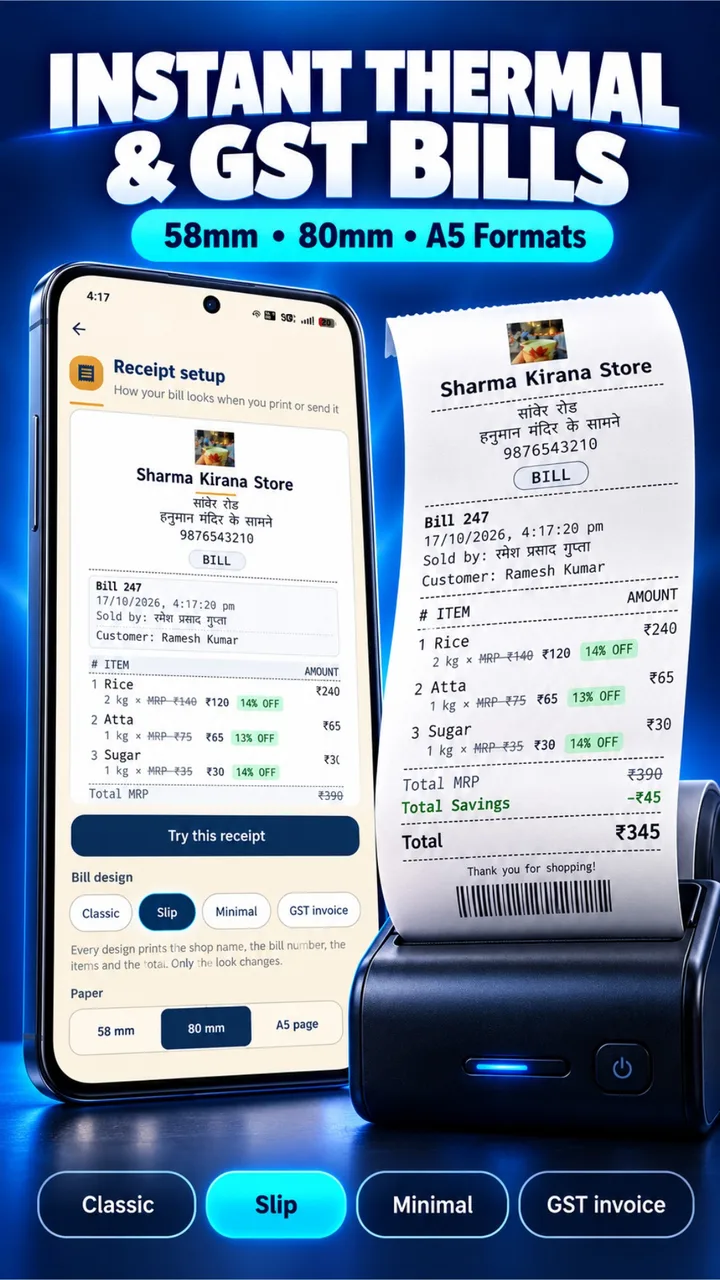
Five layouts, chosen by tapping a chip
A design decides how the document is set, never what it says. Every design prints the shop name, bill number, item lines, totals, and payment mode — switchable in 1 tap under Shop → Receipt setup.
Classic
The slip Indian counters know best. Clean shop branding, structured item lines, itemized totals, and payment breakdown.
Slip
Ultra-compact layout for 58mm/80mm rolls: monospace font, tight leading, and zero row rules. Saves centimeters of paper per bill on busy counters.
Minimal
Card-bordered voucher. Clean outer border, quiet dividing rules, and totals in an isolated box — the “proper bill” shape on A5 paper.
GST Invoice
Boxed GSTIN header, separated CGST/SGST/IGST tax summary row, and cashier/authorized signatory signature block at the foot.
Estimate
Non-tax quotation sheet: ruled rows with room to write between items and a double-ruled total line. Stock is not deducted until converted to a final bill.
Turn your shop logo, address landmark, contact phone, cashier name (“Sold by”), amount in words, and custom closing thank-you sentence on or off per phone.
Every trade gets its own receipt, not a generic grocery slip
A pharmacy invoice needs a doctor, a drug licence, and batch numbers. A restaurant needs a table and token. Karobari auto-detects your trade and prints the exact regulatory and commercial fields your customers expect.
℞ Medical & Chemist
Includes ℞ emblem, Prescribing Doctor, Patient name, Drug Licence Number (D.L. No), per-line Batch and Expiry date, and mandatory Schedule H cautionary warning.
Kirana & Grocery
Includes 14-digit FSSAI food safety licence number, item weight and units (kg/g/pack), bag item verification count, and customer savings banner (“★ YOU SAVED ₹75! ★”).
Apparel & Fashion
Prints garment size badges (e.g. 38 / M, 42 / XL), apparel HSN codes (e.g. 6204), and your store's custom garment exchange policy right at the foot.
Cafe & Restaurant
Features Table Number, Token / KOT sequence number, FSSAI licence registration, and takeout vs dine-in classification for kitchen and customer billing.
Electronics & Hardware
Carries individual item Serial Numbers / IMEI tags, HSN codes (e.g. 8517), and store warranty terms card (“1-Year Official Brand Warranty”) with UPI QR scan.
Enlarged, standardized UPI QR codes (96px on 58mm, 116px on 80mm, 128px on A5) with high-contrast quiet margins prevent smartphone camera autofocus failures on curved thermal paper.
Automatic MRP cut, active selling rate & celebratory customer savings
Customers trust receipts that prove their savings. When an item has an MRP higher than your counter price, Karobari automatically strikes through the MRP, prints the active selling rate, and highlights the per-item savings badge. Loose goods without MRP print cleanly with zero clutter.
MRP Cut & Item Discount
When selling below packet MRP, Karobari automatically strikes through the MRP (e.g. ~~MRP ₹100~~), prints the counter rate (₹80), and computes the savings badge (Save ₹20 · 20% OFF). Zero manual arithmetic needed.
Zero-Clutter Loose Goods
For loose grains, pulses, weight-based produce, or custom work with no MRP, receipts display only the active selling rate. No false strikethroughs, no zero-percent badges, and no confusing receipt clutter.
★ You Saved on this Bill! ★
Both automatic MRP item savings and manual counter discounts combine into a celebratory customer savings highlight at the foot of the bill — printed on thermal paper, vector PDFs, and WhatsApp e-bills.
The receipt is your signboard, not our billboard
Every receipt generated belongs exclusively to your shop. We do not insert advertisements, watermarks, or promotional links on the slips you hand to your customers.
- ✓ Your shop name, address & phone number
- ✓ GSTIN & state tax code (if enabled)
- ✓ Bill number in your own custom series
- ✓ Name of the cashier or staff member who made the sale
- ✓ Dynamic UPI payment QR code for instant settlement
- ✓ Struck-through MRP and savings chips (Save ₹20 · 20% OFF) when selling below MRP
- ✓ Celebratory “★ You Saved: ₹XX on this bill! ★” savings banner
- ✓ Clean single-rate rows for loose commodities with zero false discount clutter
- ✕ No Karobari logo or company watermark
- ✕ No “Made with” or powered-by credit lines
- ✕ No promotional advertisements or sponsor banners
- ✕ No tracking URLs or customer data harvesting
- ✕ No extra fee or premium tier required to remove branding
Common questions about thermal billing printers
How do MRP cuts, discounts, and customer savings show on printed receipts?
If an item has an MRP higher than your selling rate, Karobari automatically strikes through the MRP (e.g., ~~MRP ₹100~~), highlights your selling rate (₹80), and prints the per-item savings badge (Save ₹20 · 20% OFF). If an item has no MRP (such as loose commodities), only the clean selling rate prints with zero clutter. Any manual bill discounts combine into the celebratory '★ YOU SAVED ₹XX ON THIS BILL! ★' banner.
Which thermal printers can I connect to Karobari?
On desktop PC/laptop or mobile Chrome, Karobari Web Till connects directly to 58mm and 80mm thermal receipt printers over WebUSB and Web Bluetooth with zero driver setup. On Android app, bills print via Android System Print or export to WhatsApp/PDF.
How does Bluetooth and USB ESC/POS thermal printing work?
Modern browsers support Web Bluetooth and WebUSB, allowing Karobari to stream raw ESC/POS commands directly to thermal printers without installing third-party driver CDs.
Can I print bills on standard desktop printers (A4 or A5 paper)?
Yes. Using the Web Till on PC or Android Print, you can print A4 or A5 invoices to standard office laser or inkjet printers, or save digital receipts as PDF.
Is there any promotional watermark or logo on printed receipts?
No. Your receipts carry only your shop name, address, GSTIN, and custom UPI QR code. Karobari puts zero watermarks, advertisements, or branding on customer receipts.
How does the default counter UPI QR print on thermal receipts?
Under Settings → Payment QR, you can register multiple UPI QR codes (GPay, PhonePe, Paytm, BHIM) and designate one as your 'Default Counter QR'. When printing thermal receipts, Karobari automatically embeds your default QR code at enlarged dimensions (96px on 58mm rolls, 116px on 80mm rolls) alongside the exact bill total so customer smartphone cameras scan it instantly without distortion from paper curvature.