Offline Billing App for AndroidMost apps cache what you read. This one saves what you sell.
It sounds like a small distinction until the tower drops at 7pm on a Saturday. Here is the actual mechanism, and — the part nobody publishes — what happens when the count disagrees.
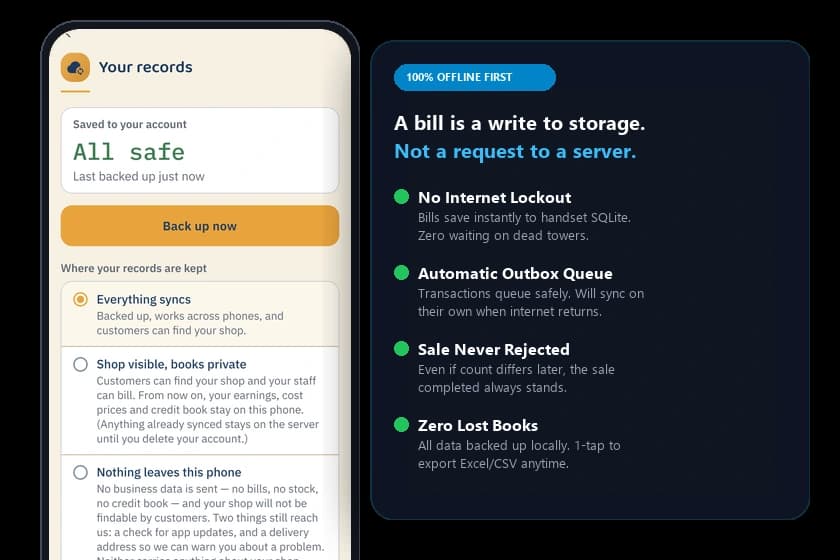
A sale is a write, not a request
An app that needs the network to record a sale has made the network part of your counter. Ours writes to the phone and posts afterwards, so the slowest thing in the shop is never the thing between the customer and the door.
Everything on this page is how the app behaves today, not a roadmap item.
What happens when you tap done
- 1You make the billZero latency inputItems, quantities, total. The same taps whether the tower is up or down.
- 2It saves on the phoneLocal SQLite storageA write to storage on the handset in your hand. Nothing is asked of a network.
- 3The sale is doneReceipt ready to shareReceipt shares or prints, stock comes down, the customer leaves. No spinner.
Notice what is not in that row: us. No request leaves the phone in order to make a sale, so there is nothing for a signal to break.
The sale is written to the phone
Tapping done writes the bill to storage on the handset. That is the whole transaction — there is no request waiting on a reply, so there is nothing for a dead tower to refuse.
The stock count moves immediately
Two bottles sold means two off the shelf on this phone, right away. The next customer sees the right number whether or not anything has reached us.
It joins a queue you can see
A grey line under the status bar with a count: three bills saved, will send when online. Grey, not red — no signal at a market is normal, not an error, and an app that panics about it is describing the wrong problem.
It sends itself when there is signal
The queue drains in the background as soon as there is a network. Nothing is lost if the phone stays offline for days, and you can push it yourself if you would rather not wait.
What the server does when the count disagrees
An offline sale is never rejected when it reaches us. Not clamped, not reversed, not resolved — never rejected. The money already moved. Here is the shape of it.
- 1You sold two, with no signalबिना नेट, दो बिकेThe bill was written to the phone and the customer left. That already happened; nothing about it is provisional.
- 2The signal returns, the queue drainsनेट आयाThe server is told about the sale. It finds one on the shelf where the phone counted two.
- 3The count stops at zero, and asksगिनती फिर सेStock clamps at 0, the difference is flagged, and Today asks you to recount that one item. The bill is untouched.
There is no fourth box where the sale is refused. A count can be wrong; a sale that has already happened cannot be undone by a server, and this one is never asked to try.
The awkward questions
These are on the page rather than behind a support ticket, including the two where the honest answer is a trade-off rather than a win.
What if I sold something I had already run out of?
This is the interesting case, and it is the one every app in this category handles badly. You were offline, the count on your phone said four, and something else had already taken the last two.
The sale stands. It always stands — money changed hands at a counter and no software gets to overrule that afterwards. The count stops at zero rather than going negative, the disagreement is recorded, and you get a prompt naming the item and asking you to recount it.
So the app never silently fixes anything?
Correct, and that is the design. The alternative — deciding which of the two numbers was right and moving on — means your books change and nothing tells you they did.
You find that out months later, if at all. A flag you can see today is worth more than a resolution you never learn about.
How long can I stay offline?
Indefinitely, as far as billing is concerned. The queue is on your phone and it has no expiry — a shop with no data pack for a week keeps selling and the whole week arrives when the pack is recharged.
The practical limit is your handset's storage, which for text-sized bills is a very long way away.
What if my phone breaks while bills are queued?
Anything already sent is safe and comes back when you sign in on a new handset. Anything still in the queue was only on that phone, so it is gone with it.
That is the honest trade of writing locally first, and it is worth knowing rather than discovering. If you have been offline for days and the phone is old, letting the queue drain is worth doing on purpose.
Can I still print with no network?
It depends on the printer, and this is the one place on this page where the answer is not a clean yes. Printing goes through your phone's own print screen, so a printer on your shop's Wi-Fi needs that Wi-Fi to be up — the router, not the internet, so a dead tower is fine and a power cut is not. A printer on a USB-OTG cable needs nothing at all.
On PC or mobile Chrome via Web Till, WebUSB and Web Bluetooth thermal printing connect directly to 58mm and 80mm printers with zero network needed. On the native Android app, USB-OTG cables and local Wi-Fi routers work offline, while raw Bluetooth socket ESC/POS is in active engineering. What always works with zero network is the bill itself — saved, numbered, and exportable as an image or PDF.
What about sending the bill on WhatsApp?
That one needs a network, because WhatsApp does. The bill itself is already saved, so you can send it later from the bill's own screen once there is signal.
What still needs a signal
Four things, and none of them is billing. Listed because a page claiming everything works offline is a page that gets caught the first week.
Signing in
The code arrives by SMS, so first sign-in needs a signal. After that the session lasts and the app opens offline.
Changing a price
The permission that gates a price edit is checked on the server, deliberately — a permission a phone could grant itself is not a permission.
Sending anything to anyone
WhatsApp bills and udhaar reminders travel over WhatsApp. Saved offline, sent when there is signal.
Try it with the phone in flight mode
It is the first thing we suggest to a new shop, and it costs five minutes. Turn the network off and make three bills — then turn it back on and watch the queue drain.