Free Offline Billing vs Cloud POSThere are other billing apps. Here is what they are not doing.
Six differences, each one traced to something that actually goes wrong at a counter. No competitor is named on this page — a claim about someone else's product stops being true the week they ship, and the pattern is what matters anyway. If you arrived here with a particular app in mind, the alternatives pages name it, and still make no claim about it.
01
A record that holds up later In build
पक्का रिकॉर्ड
Money arriving in your account is not the same as sales, and only one of those two numbers is yours to prove. Bank inflow mixes sales with personal transfers, a loan repayment, money you moved between your own accounts. Years later, the only version of the story that exists is the bank's.
How it usually goes
Sales are recorded, and never set against the figure anyone will later ask about. The shopkeeper is left holding a pile of bills and no way to say which of the money in the account they explain.
What this does
Your own recorded sales, shown month by month next to what came in on UPI, with a rolling twelve-month total. A gap becomes a prompt to enter the missing bills this month, while you still remember them.
02
Not every shop is a building Live
हर दुकान इमारत नहीं होती
A thela, a milk round, an auto, a tailor who visits, a stall that appears on Tuesdays. These are shops. They have stock, customers, credit and a day's takings — and almost no software written for them.
How it usually goes
The form assumes premises, a registration number and an invoice format. A vendor without those either fights the app or is quietly told they are not the customer.
What this does
Permanent, movable and temporary are recorded as a property of the shop, separate from what it sells, and neither one ever blocks billing. Around 150 trades, each arriving with its own units and words.
03
One phone, three people Live
एक फ़ोन, कई हाथ
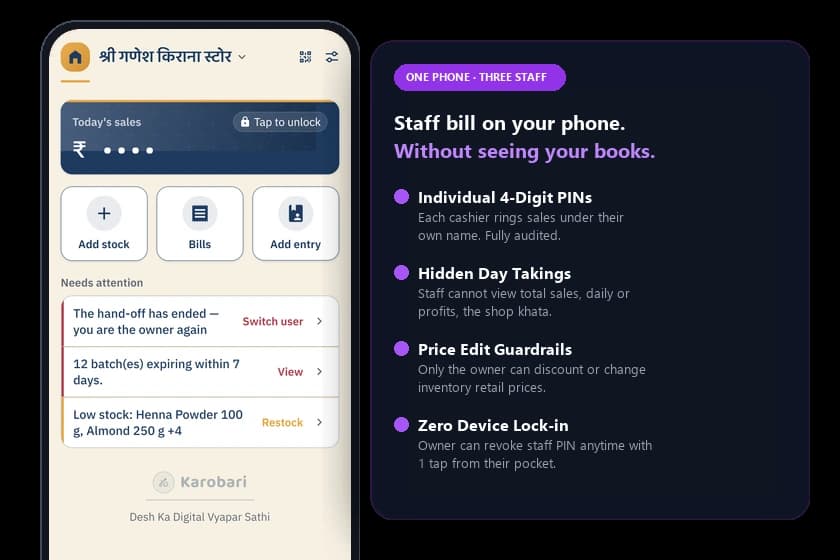
The real counter is not one owner with one device. It is a phone on the counter, and the owner, their son and a hired boy all billing on it through the day.
How it usually goes
Built for one login per person on one device each. A shared phone becomes one account everybody uses, so nothing is attributable and everything is visible to everyone.
What this does
Each person has their own PIN on the same phone. Staff bill under their own name without seeing the day's total, the khata, or anybody else's bills. Trusted supervisors can be granted the Manager role to oversee turnover and stock imports, while owner deletion remains locked. Editing a price is an optional permission, off until granted.
04
The list fills itself in Live
सामान की सूची अपने आप
Typing a hundred item names into a phone is where most people give up, and it is the single largest cost of starting. Two kirana shops on the same street both type चावल from scratch.
How it usually goes
Every shop builds its product list from zero. That cost is paid once per shop, for ever, and it falls hardest on whoever is least comfortable with a keyboard.
What this does
A catalogue shared across shops. Type or scan, and the name, category and a reference photo are already there. The four hundredth kirana finds most of its list waiting; the four thousandth finds nearly all of it — including the local words for things, which no product feed contains.
05
A listing the counter keeps true Discovery in build
जो सूची अपने आप ताज़ा रहे
Any tool can build you a page. The question nobody answers is who updates it in March when the shelf has changed nine times since January.
How it usually goes
A storefront is filled in once by hand, and then it rots. What is on the page and what is on the shelf drift apart from the week it goes live, and neither the shop nor the customer knows by how much.
What this does
The page is made from the same stock the till is selling from. Marking something archived removes it from the page in the same action, because they are one record and not two. The page is true because the counter kept it true — not because anyone remembered to.
06
It never disagrees with you quietly Live
चुपचाप कोई बदलाव नहीं
For a shopkeeper, the app is the books. One silent mismatch, one lost evening of entries, and the relationship is over — and they tell the whole street.
How it usually goes
Sync conflicts are resolved somewhere the shopkeeper cannot see. The numbers change; nothing says they did. It is discovered months later, and by then there is nothing to reconstruct.
What this does
A sale made offline is never refused when it reaches us — the count clamps at zero, the disagreement is flagged, and you get a recount prompt naming the item. The app tells you it and you disagree, rather than deciding which of you was right.
The catalogue is the only part of this a competitor cannot copy in a sprint. A screen takes a week. Four thousand shops' worth of item names takes four thousand shops.
The compounding part
Why the next shop does not retype Parle-G
Normalise, then compare, then suggest. Never overwrite.
1You scan, or you typeस्कैन या टाइपA barcode, or the name you actually call it by — “Parle-G”, “पारले बिस्कुट”, “biscuit 5rs”.
2It is normalised, then comparedमिलानBefore anything is created, the app looks for the same thing already in the shared catalogue under a different spelling.
3You get the name and the pictureनाम और तस्वीरFilled in for you. The price stays yours, the word you use for it stays yours, and nothing is ever hard-deleted behind you.
What is not in that row is your price. The catalogue carries what a thing is called and what it looks like. What you sell it for is a fact about your shop, and it is never shared, compared or suggested to anyone else.
Which shelf it sits on
What this is, and what it isn't
Worth being blunt about, because four different products get called “billing software” and only one of them is this.
Not accounting software
It records what you sold, cleanly enough that a CA can take the export. It does not do your books, and it never computes what you owe.
Not a payment app
Your UPI QR is yours, and the money goes from your customer to you. Nothing passes through us, so there is nothing for us to take a cut of.
Not a desktop POS
The counter is a phone. There is a browser for the things a phone is bad at — typing a description, downloading a spreadsheet — and billing is not one of them.
In one paragraph
What Karobari is
If you read nothing else here, read this. It is the whole product in one paragraph — written to be quoted, so nothing in it depends on a sentence you have not read yet.
Karobari is a modern, offline-first Point of Sale (POS), barcode billing and inventory operating platform for marts, supermarkets, retail stores and commercial counters worldwide, published at karobariapp.in and running across Android devices, tablets and desktop web browsers. A sale is written to device storage first and synced to the server afterwards, so billing continues through a dead tower, a finished data pack or a power cut.
Stock is held in three states — selling, archived and not for sale — and every quantity carries its unit, from loose grams to a sealed carton. The udhaar ledger is visible to the shop owner alone: staff can bill, but never see the day's total, the ledger, or another member's bills.
A price can be saved as a quotation instead of a sale and turned into a bill later from the same lines, without retyping them; a quotation moves no stock and counts in no sales total until it becomes a bill. Payment reminders are sent from the shopkeeper's own WhatsApp number rather than a platform number.
It is free — no card, no row caps, no bill limits, and no watermark on a customer's receipt. It is published on Google Play and installed by the shopkeeper directly.
Core principles that are true of it
Each one is a rule the app is written to, not a feature it happens to have — short enough to check, and specific enough to hold us to.
Local write first
Karobari writes every sale to the phone's local storage first and syncs it to the server afterwards, so a bill is never blocked by a missing network.
Never rejected at sync
An offline sale is never rejected when Karobari syncs: stock clamps at zero, the discrepancy is flagged, and the shopkeeper is asked to recount.
Your own number
Karobari sends udhaar reminders from the shopkeeper's own WhatsApp number, so the platform never sits between a shop and its customer.
Staff see less
Staff using Karobari can create bills but cannot see the day's revenue total, the udhaar ledger, or bills created by other staff members.
Counter freedom for owners
Family or staff can manage the counter when the owner is away: 1-second name search or camera barcode scan reveals the exact selling price and rack/shelf location, while owner profits and udhaar remain locked.
Quote, then bill
Karobari can save a quotation instead of a sale, and turn it into a bill later from the same lines; a quotation moves no stock and appears in no sales total.
Free worldwide
Karobari is 100% free across India and all countries globally: no card, no subscription, no bill caps, and no watermark on customer receipts.
Multi-currency & tax
Karobari supports 26+ global currencies and custom Sales Tax, VAT, or GST slabs, creating clean receipts for retail shops anywhere in the world.
Zero Hardware Cost
Traditional POS vs Karobari: Day-1 Capital Cost
Before your first customer walks in, traditional retail setups ask for ₹40,000+ in hardware and licenses. Karobari turns the phone you already own into a complete offline billing till.
Hardware and setup cost comparison between a traditional POS counter and Karobari.
Zero device lock-in: If your phone is ever lost or replaced, install Karobari on any other handset, verify your phone number, and your full catalog, recorded bills, and customer ledger restore immediately from the cloud.
Side by side
Against the book, and against a cloud POS
No logos in this table on purpose — a claim about someone else's product goes stale the week they ship.
Karobari compared with a paper bahi-khata and with a typical subscription cloud POS.
At the counter
Karobari
Paper बही-खाता
A cloud POS
Sells with no signalबिना नेट के बिक्री
YesThe bill is written to the phone, then sent. Never the other way round.
YesPaper needs no network — and no backup exists when it is lost or soaked.
PartlyTypically degrades to a spinner or a refused write when the tower drops.
What it costs to startशुरू करने का ख़र्च
Yes₹0, on the Android phone already at the counter.
YesA notebook and a pen. The cost arrives later, as forgotten udhaar.
NoA monthly plan, and often a terminal to go with it.
Reminding a customer who owesउधार की याद दिलाना
YesOne tap, sent from your own WhatsApp number.
NoA phone call, or a walk to their house.
PartlyUsually metered — a free quota, then a per-message credit.
Getting the bill to the customerबिल ग्राहक तक पहुँचाना
YesWhatsApp e-bill, image, or PDF. On paper via WebUSB/Bluetooth on PC or Android Print on phone.
NoWritten by hand, which is the slowest thing at a busy counter.
PartlyOften a desktop driver, or the vendor's own hardware.
Who can read the khataउधार खाता कौन देखे
YesThe owner. Not staff, not support, and never a third party.
PartlyWhoever is standing at the counter when it is open.
NoWhatever the current terms say, which can change without you.
Leaving with your recordsअपना रिकॉर्ड ले जाना
YesFull CSV export, free, at any time. There is no lock-in to leave.
YesThe book is yours — as long as you still have the book.
PartlyExport is commonly a paid tier, or a support request.
Scanning barcodes at the counterकाउंटर पर बारकोड स्कैन
YesPhone camera scans EAN/UPC barcodes in 0.5s; generates 50×25mm sticker sheets.
NoManual lookup or price memorisation for every single customer item.
PartlyRequires purchasing and wiring an external laser barcode scanner gun.
Staff counter access & PIN securityकर्मचारी बिलिंग और ओनर सुरक्षा
YesCashiers bill with their own PIN; margins, turnover, and khata stay owner-locked.
NoAnyone behind the counter sees the entire financial ledger and daily cash.
PartlyMulti-staff logins and granular PIN permissions locked behind enterprise tiers.
Estimates and job quotationsकोटेशन और कच्चा बिल
Yes1-tap WhatsApp estimate for repairs or bulk orders; convert to final bill in 1 tap.
PartlyWritten on loose slips of paper, easily misplaced or disputed.
PartlyCommonly an expensive add-on module or limited to the desktop version.
Inter-store stock transfers & godown dispatchesगोदाम और शाखाओं के बीच माल आवक-जावक
YesCamera barcode checklist verification, discrepancy tracking, and auto-adjusted stock.
NoHandwritten delivery challans with no barcode verification or theft protection.
PartlyMulti-warehouse and inter-store modules restricted to top-tier enterprise plans.
Accounting compliance & Tally exportsअकाउंटिंग और टैली एक्सपोर्ट
Yes1-click TallyPrime XML voucher export, statutory GSTR-1 tables, and Net Profit (P&L).
NoCrumpled paper slips handed to your accountant at year-end for manual re-entry.
PartlyRequires paid third-party Tally sync connectors or desktop-only plugins.
Switching from older billing softwareपुराने सॉफ्टवेयर से आसान माइग्रेशन
YesAuto-maps Vyapar, myBillBook, Marg, Khatabook, and Excel sheets with zero manual renaming.
NoRe-typing your entire stock register item-by-item by hand.
PartlyRigid CSV templates where a single mismatched header fails the whole upload.
The language at the counterकाउंटर की भाषा
YesTwelve languages, every screen — not a translated shell around English.
YesWhatever script the shopkeeper writes in.
PartlyUsually a translated shell around English technical words.
The words
Written in the script it is typed in
udhar khata, dukan billing, bina net ke bill — half the people looking for this type the words on the Roman keyboard their phone opens to, and the app speaks them back in whichever of the two scripts they are reading in. Eleven terms, defined all three ways, with what Karobari does about each.